Today we’ll try to shed some light on dark undocumented corners of Matlab’s external interfaces.
Matlab provides several ways to call into external native code – if you have just the binaries for this code, the way is loadlibrary. To help parse the external dll contents you’d need to initially provide loadlibrary a C/C++ header file, but you can then tell loadlibrary to transform this header info into a Matlab-native representation typically named a ***proto.m file. When the proper loadlibrary call is made, a proto.m file is generated along with something named ***_pcwin64_thunk.dll (well, on x64 pc’s, obviously). The documentation says nearly nothing about either proto files or thunk files:
A prototype file is a file of MATLAB commands which you can modify and use in place of a header file. …
A thunk file is a compatibility layer to a 64-bit library generated by MATLAB.
One could do with this terse phrasing until something goes wrong – as it inevitably does. Googling shows only that this seems to be an open question online as well. Time to peek inside.
Peeking inside
Take a toy C++ dll:
// ToyDLL.h
#ifdef TOYDLL_EXPORT
#define TOYDLL_API __declspec(dllexport)
#else
#define TOYDLL_API __declspec(dllimport)
#endif

extern "C" { TOYDLL_API bool ToyFunc(int a, int b, double c); }

// ToyDLL.cpp: build with /D TOYDLL_EXPORT

#include "ToyDLL.h"
#include <stdio.h>
#include <tchar.h>

extern "C" {
	TOYDLL_API bool ToyFunc(int a, int b, double c)
	{
		_tprintf(_T("%d, %d, %f"), a, b, c);
		return true;
	}
}
Build it, try to loadlibrary it in Matlab, and get:
Error using loadlibrary
Call to Perl failed.  Possible error processing header file.
Output of Perl command:
Working string is 'extern " C " {  bool ToyFunc ( int a , int b , double c ); }'.
at C:\Program Files\MATLAB\R2016a\toolbox\matlab\general\private\prototypes.pl line 1099
main::DumpError('extern "C" { found in file. C++ files are not supported.  Use...') called at C:\Program Files\MATLAB\R2016a\toolbox\matlab\general\private\prototypes.pl line 312
ERROR: extern "C" { found in file. C++ files are not supported.  Use #ifdef __cplusplus to protect.

Found on line 13 of input from line 12 of file ToyDLL.h
Hmmmm. The perl script prototypes.pl is shipped with Matlab (the error message above gives its full path), and the first few of its 1000 lines are:
# Parse a C/C++ header file and build up three data structures: the first
# is a list of the prototypes defined in the header file; the second is
# a list of the structures used in those prototypes.  The third is a list of the
# typedef statements that are defined in the file
It should be noted already that the C – C++ boundary is extremely fuzzy as far as Matlab is concerned. Not only is this script declared to ‘Parse C/C++ headers’ only to complain later that ‘C++ is not supported’, loadlibrary itself is advertised to ‘Load C/C++ shared library into MATLAB’ only to disclaim elsewhere that ‘The MATLAB® shared library interface supports C library routines only’ and offer various workarounds for C++. More details later, but for now let’s humor the grumpy perl script and modify the header (it never touches the cpp) into:
// ToyDLL.h
#ifdef TOYDLL_EXPORT
#define TOYDLL_API __declspec(dllexport)
#else
#define TOYDLL_API __declspec(dllimport)
#endif

#ifdef __cplusplus
extern "C" {
#endif

TOYDLL_API bool ToyFunc(int a, int b, double c);

#ifdef __cplusplus
}
#endif
And now loadlibrary quietly succeeds.
Peeking deeper inside
As the perl source is available you could in principle study it to understand what it does – but I certainly couldn’t, in principle or not (it’s horrible even as far as perl scripts go). With some semi-hacking, we can just inspect its output. First, fire up Process Monitor and filter to process ‘perl.exe’ to observe the exact files it receives and generates:
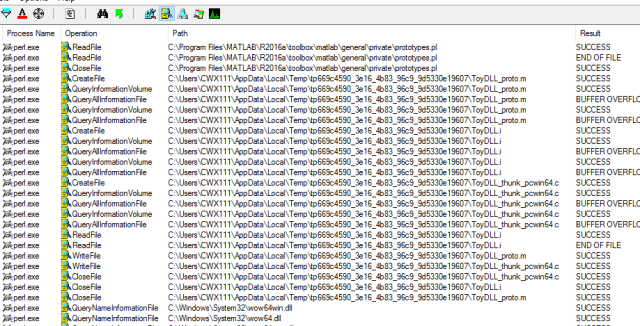
Observe that the perl script operates on the VC-preprocessed file ToyDLL.i This could also be seen by examining earlier portions of the ProcMon trace or by noting that prototypes.pl itself declares internally its usage as –
# prototypes [options] [-outfile=name] input.i [optional headers to find prototypes in]
Next, observe that it outputs the source file ToyDLL_thunk_pcwin64.c. Alas, trying to open it teaches that it is very short lived. The final hack is to copy this temp file somewhere upon its creation. I considered coding such a tool (shouldn’t be too much trouble) but thought I’d google for one first and luckily did come across the free edition of Limagito. After some tweaking (*Edit: more details below) I got a nice persistent copy of the thunk.c source, which is essentially:
…
#include <tmwtypes.h>

/* use BUILDING_THUNKFILE to protect parts of your header if needed when building the thunkfile */

#define BUILDING_THUNKFILE

#include "ToyDLL.h"

/*  bool ToyFunc ( int a , int b , double c ); */
EXPORT_EXTERN_C bool boolint32int32doubleThunk(void fcn(),const char *callstack,int stacksize)
{
int32_T p0;
int32_T p1;
double p2;
p0=*(int32_T const *)callstack;
callstack+=sizeof(p0) % sizeof(<em>size_t</em>) ? ((sizeof(p0) / sizeof(<em>size_t</em>)) + 1) * sizeof(<em>size_t</em>):sizeof(p0);
p1=*(int32_T const *)callstack;
callstack+=sizeof(p1) % sizeof(<em>size_t</em>) ? ((sizeof(p1) / sizeof(<em>size_t</em>)) + 1) * sizeof(<em>size_t</em>):sizeof(p1);
p2=*(double const *)callstack;
callstack+=sizeof(p2) % sizeof(<em>size_t</em>) ? ((sizeof(p2) / sizeof(<em>size_t</em>)) + 1) * sizeof(<em>size_t</em>):sizeof(p2);
return ((bool (*)(int32_T , int32_T , double ))fcn)(p0 , p1 , p2);
}
For completion, here is the generated ToyDLL_proto.m file:
function [methodinfo,structs,enuminfo,ThunkLibName]=ToyDLL_proto
%TOYDLL_PROTO Create structures to define interfaces found in 'ToyDLL'.
%This function was generated by loadlibrary.m parser version  on Fri Jul 15 17:50:20 2016
%perl options:'ToyDLL.i -outfile=ToyDLL_proto.m -thunkfile=ToyDLL_thunk_pcwin64.c -header=ToyDLL.h'
ival={cell(1,0)}; % change 0 to the actual number of functions to preallocate the data.
structs=[];enuminfo=[];fcnNum=1;
fcns=struct('name',ival,'calltype',ival,'LHS',ival,'RHS',ival,'alias',ival,'thunkname', ival);
MfilePath=fileparts(mfilename('fullpath'));
ThunkLibName=fullfile(MfilePath,'ToyDLL_thunk_pcwin64');
%  bool ToyFunc ( int a , int b , double c );
fcns.thunkname{fcnNum}='boolint32int32doubleThunk';fcns.name{fcnNum}='ToyFunc'; fcns.calltype{fcnNum}='Thunk'; fcns.LHS{fcnNum}='bool'; fcns.RHS{fcnNum}={'int32', 'int32', 'double'};fcnNum=fcnNum+1;
methodinfo=fcns;
Putting it all together
Now that all the raw material is at hand, we can gain some insight on what these components do and how.
The proto file is about calling the thunk
It contains the path to the thunk dll, and a ‘dictionary’ that tells Matlab what thunk function needs to be called en route to each dll-exported function. For our toy case, to get to ToyFunc Matlab calls into ‘boolint32int32doubleThunk’ – a name encoding the output and all input types, but in principle every other name could be used.
The thunk DLL is about adjusting calling conventions
The thunk function boolint32int32doubleThunk receives its arguments in the Matlab calling convention: all arguments are passed consecutively on the stack, untyped and aligned on sizeof(size_t) (64 bytes in x64) boundaries. It also receives a function pointer to the actual DLL export, and after copying the arguments to local typed variables – calls this function with its native calling convention. It never uses the ‘stacksize’ argument.
In real life cases the headers and generated thunks can get considerably more complicated – one notable omission so far is how structs and other compound types are handled (as far as I can tell this is the sole reason for inclusion of the library header in the thunk.c). The same technique laid out above can be used to investigate these cases, but we can already put all this newfound knowledge to good use.
Troubleshooting
Take our ToyDLL.h above and add to it the seemingly benign lines:
class ToyClass
{
ToyClass() {};
~ToyClass() {};
};
Build and try to load the resulting DLL into Matlab, only to get:
Error using loadlibrary
Building ToyDLL_thunk_pcwin64 failed.  Compiler output is:
cl -I"C:\Program Files\MATLAB\R2016a\extern\include" /Zp8  /W3  /nologo
-I"[…]ToyDLL" "ToyDLL_thunk_pcwin64.c" -LD -Fe"ToyDLL_thunk_pcwin64.dll"
ToyDLL_thunk_pcwin64.c
[…]\ToyDLL\ToyDLL.h(10): error C2061: syntax error: identifier 'ToyClass'
[…]ToyDLL\ToyDLL.h(10): error C2059: syntax error: ';'
[…]ToyDLL\ToyDLL.h (11): error C2449: found '{' at file scope (missing function header?)
[…]ToyDLL\ToyDLL.h (14): error C2059: syntax error: '}'
We didn’t violate any of loadlibrary’s documented limitations but we already have enough visibility into the process to understand what’s going on. The root issue is that for whatever reason the perl script generates a c file, not a cpp one.
The workaround I used, both in this toy scenario and in the real life DLLs I wanted to load into Matlab, was – grab the perl-generated sources, rename them to cpp and build your own thunk.dll .
In the immortal words of Todd Howard, It just works. Solves plenty of other C/C++ idiosyncrasies too.
Now I have exactly zero insight into Mathworks considerations and decisions, but I have this vague suspicion the only reason for these half-hearted ‘C-only’ limitations is that they’re stuck with this essentially black-box perl script that parses headers. Most of the time it succeeds (on C++ headers too), sometimes it doesn’t. When it doesn’t, they sometimes document the root cause as unsupported.
The question remains, who in their right mind would try to parse a header with a perl script. Based on my own experience, I can suggest sort of an answer.
Bonus
This discussion can lead to all sorts of other workarounds and solutions. Here’s, briefly, another one that was useful to us.
When the Matlab component consuming the native DLL is deployed, the loadlibrary call is made from wherever the CTF archive was extracted to – and it occasionally fails to find the thunk dll. Our solution was to intervene in the proto.m file, and have it take the thunk path from the registry.
Perhaps more on CTF archives one day.
Edit June 2017: Per @AlishaMenon’s request, here are some more details about the Limagito usage.
First, under Scan Setup/Change Notify/WIN source:
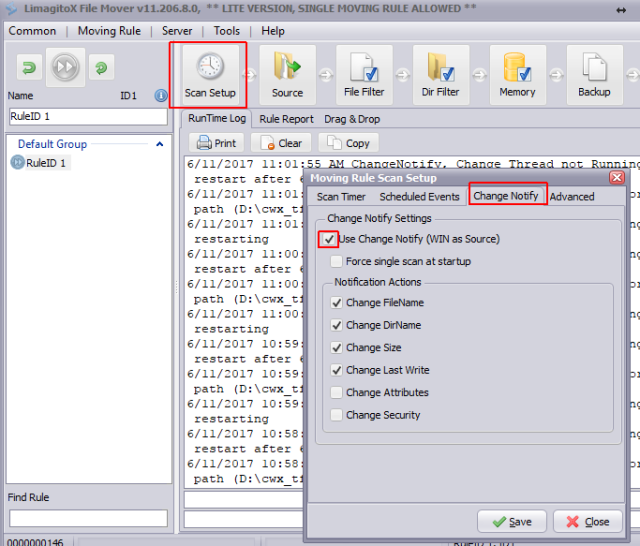
Second, set the directory where compilation takes place (where the temp files are generated) under Source/WIN:

Finally set the destination folder where you want the copy:
And you should be good to go.
Edit 2020: Turns out the gymnastics for grabbing the temporary ToyDLL_thunk_pcwin64.c file were redundant all along. You can just use the undocumented loadlibrary option: “notempdir”. If you do, the temporary files (ToyDLL_thunk_pcwin64.c and others) will stay in place for you to play with.







 Ofek's Visual C++ stuff
